Search internal documents with Apache Solr™ and MCP

Search the documents before asking the model
When you need answers from thousands of internal documents, feeding the entire collection into an LLM can add unnecessary cost and delay. Sending sensitive content to an external AI service also requires careful control over what is shared.
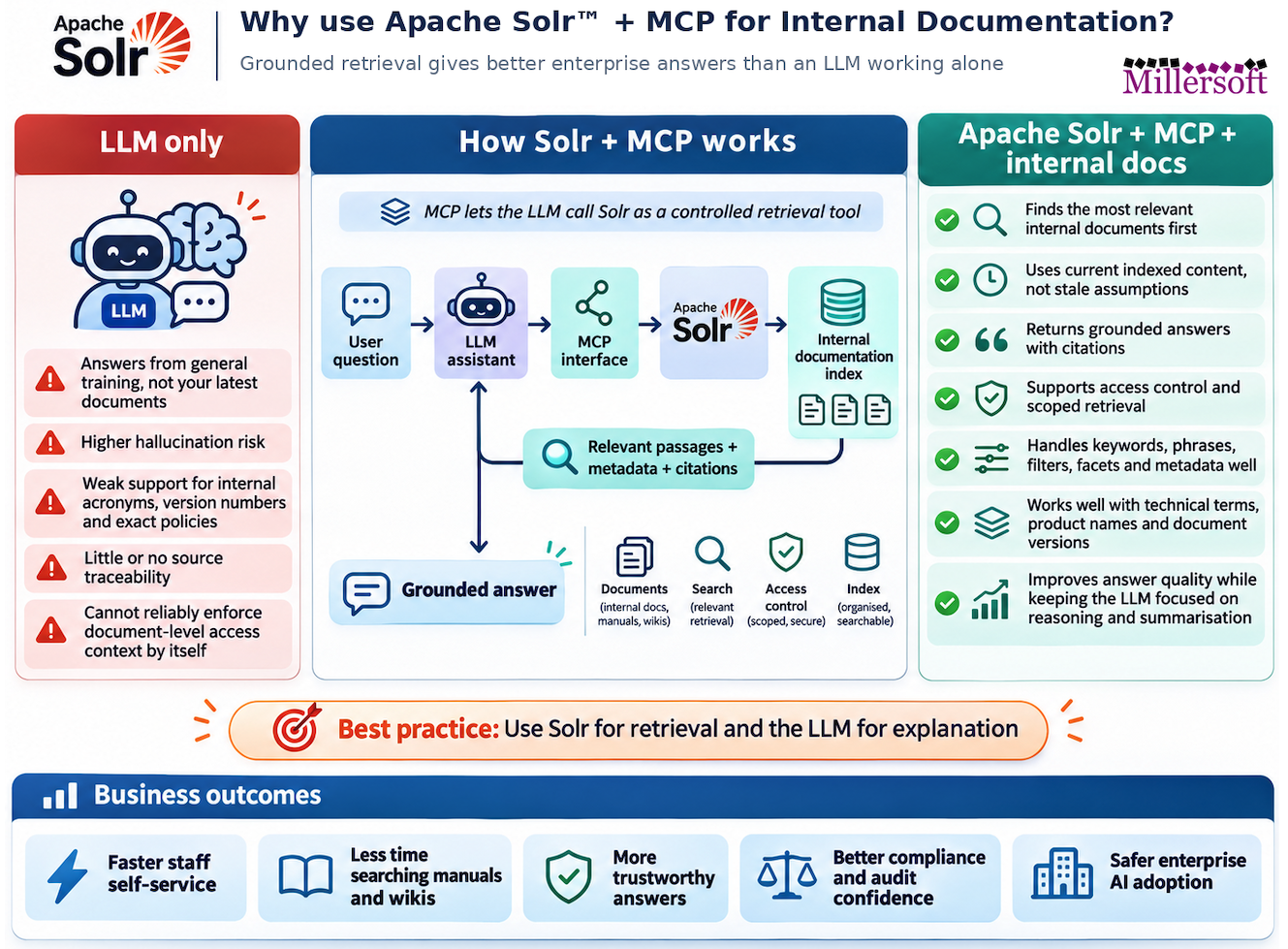
A more practical approach is to index your documents with Apache Solr™ and connect it to an AI assistant through a Model Context Protocol (MCP) interface.
 (opens the full-size image in a new tab)
Start with the repositories people already consult, such as a policy library, a product manual or a support wiki. Index the document text with the title, source URL, section heading and version or effective date. Those fields help distinguish a current procedure from a superseded one and give the assistant enough information to direct someone to the right place.
An MCP server can expose a read-only search tool that accepts a question or search terms and queries Solr on the user’s behalf. It can limit the number of results and return only the excerpts and metadata needed for the answer. Keeping the amount of text sent to the model small can reduce processing time and input costs. MCP tools specification
Retrieve relevant passages and cite the source
Solr retrieves the relevant passages. The LLM uses that evidence to answer questions and produce summaries, with references back to the source documents.
Consider a support engineer asking which maintenance procedure applies to a particular product version. The search tool can filter by product and version, then use Solr’s highlighting to return matching passages from the applicable manual. The assistant can summarise the steps and cite the manual title, version and section so the engineer can check the details. Apache Solr guide to filters and highlighting
Give the assistant a source link and section reference with each passage so it can tie individual claims to the evidence. If the search returns two conflicting procedures, the answer can show which versions it found and ask the user to confirm which one applies. When the retrieved excerpts lack enough detail, the assistant can say what it found and where the evidence is incomplete.
Control what the assistant can retrieve
You can run Solr on premises or in your own cloud environment, with access controls governing what the assistant can retrieve. Where the AI model runs and how it handles that information still matter.
Apply document permissions in the retrieval service before any excerpt reaches the model. Use the signed-in user’s identity and the source system’s permissions to determine which documents can be returned. Keep the index current when access is revoked, a document is deleted or a procedure is replaced, and test those cases with accounts that have different permissions.
Review where questions and excerpts are processed, and whether the assistant, model provider or monitoring tools retain them in logs. A useful pilot starts with one approved collection and a set of real questions. Measure response time and model input size, check that each citation supports the answer, and confirm that restricted documents stay out of responses. The results give you a basis for deciding whether to add more collections.
For help with an existing index or a pilot, explore Millersoft’s Apache Solr support for AI document search.
Discuss your internal document search project
Tell us what your team needs to find, where the documents are stored and what access restrictions apply.
Talk to us about Solr and MCP