Go beyond standard Dynamics 365 reporting with an independent data warehouse

Dynamics 365 can run your finances, supply chain and customer relationships while your analytical history remains under your organisation's control. When reports span applications, acquired businesses and several years of change, you need a consistent record that can survive the next ERP decision.
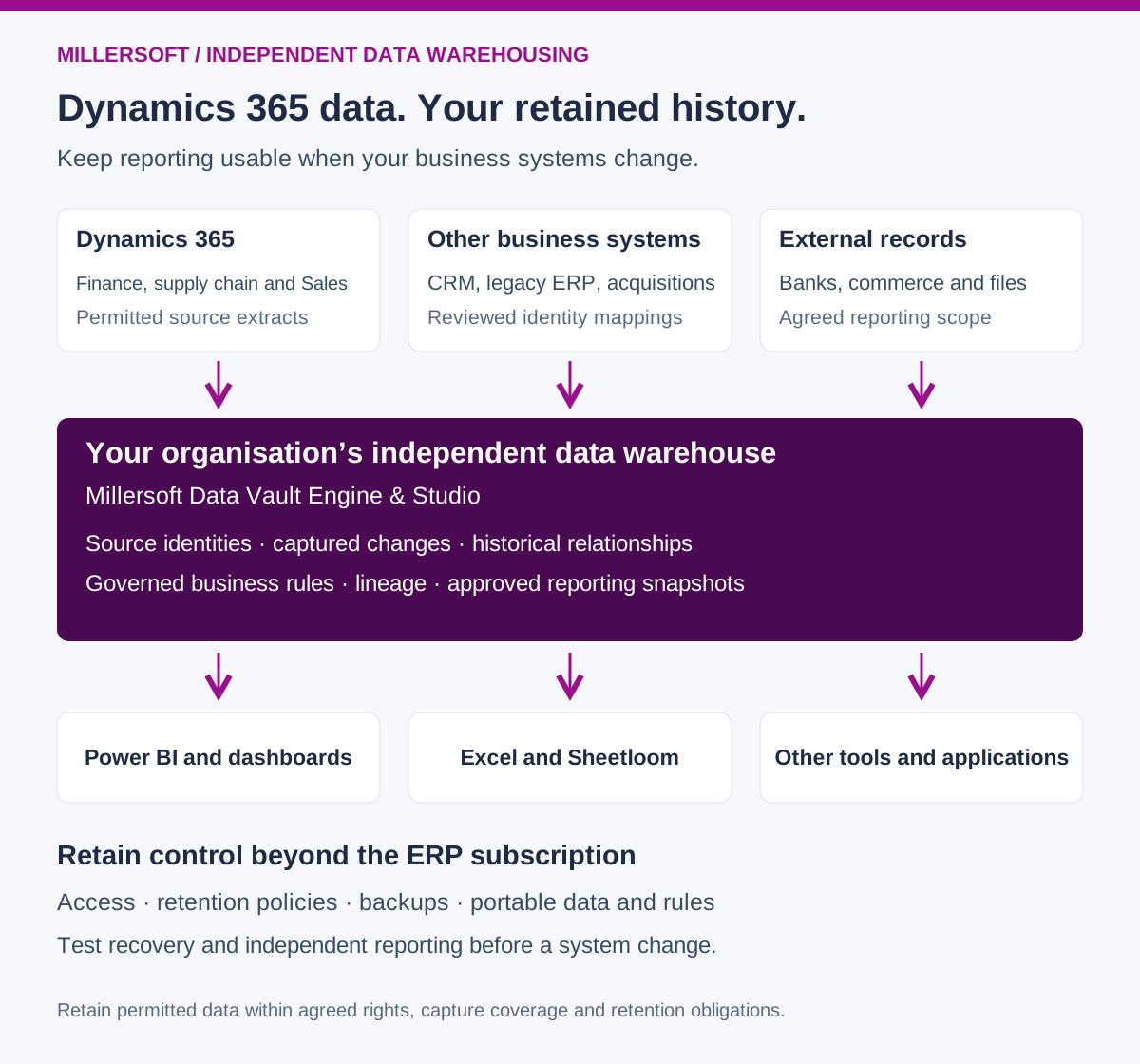
The open source Millersoft Data Vault Engine & Studio brings permitted Dynamics 365 data together with other business sources, preserves captured history and supports governed reporting. The software is free and open source; source-access licences, infrastructure, implementation and support are separate considerations.
Retain the data, definitions and evidence needed to explain your business, including when your application strategy changes.
 (opens the full-size image in a new tab)
One Dynamics 365 name, several reporting models
Dynamics 365 Finance and Supply Chain Management, Dynamics 365 Sales on Dataverse, and Business Central have different data models and integration routes. A Sales account, a Finance legal entity and a Business Central company are different concepts. Matching their codes without understanding that distinction can produce convincing but incorrect totals.
The first step is to identify which applications, environments and companies supply each measure. An order forecast may begin in Sales, become an order in an ERP, and incur delivery and support costs elsewhere. A governed warehouse preserves those source identities and connects them through reviewed relationships.
It also keeps time explicit. The current opportunity value, final inventory cost or latest customer grouping may differ from what the business knew when it approved a report.
Five advanced Dynamics 365 reporting challenges a Data Vault helps you solve
How Millersoft Data Vault Engine & Studio works
Data Vault Engine supports repeatable ingestion and historical modelling. Data Vault Studio supports the design and maintenance of that architecture. Together, they help build a retained analytical record around your business identities, relationships and descriptive changes.
Source access is designed for the actual deployment, rather than assumed from the Dynamics 365 brand.
| Source | Integration routes to assess | Evidence to validate |
|---|---|---|
| Finance and Supply Chain Management | Supported Azure Synapse Link configurations, data entities and controlled exports appropriate to the workload | Required tables, company context, customisations, update and deletion handling, initial load and refresh coverage |
| Sales and other Dataverse applications | Supported Dataverse export or API routes and relevant forecast interfaces | Opportunity relationships, submitted adjustments, selected audit coverage and capture cut-offs |
| Business Central | Published REST APIs and appropriate OData services, with extensions where needed | Company identity, document lines, ledger relationships, custom fields and service limits |
| Other systems | Permitted APIs, files or controlled feeds | Shared identities, units, currencies and source reconciliation |
Microsoft documents finance and operations data selection and incremental export options in Azure Synapse Link for Dataverse. Business Central exposes a separate set of REST API and OData web services. Coverage, permissions and operational limits need establishing for your chosen route.
The warehouse retains source and load timestamps where available, plus business effective dates where supplied or governed. Curated views apply approved calculations for Power BI, Excel, Sheetloom and other applications. A warehouse preserves captured evidence; it cannot recover every intermediate change from occasional current-state extracts.
Assess the dependencies in the Microsoft analytics stack
Microsoft provides capable reporting and analytics tools. Dynamics 365 Finance has native consolidation and financial reporting options. Dataverse can link to Microsoft Fabric, and Azure Synapse Link can export data to customer-controlled storage. These are useful integration choices, and an independent Data Vault can use suitable Microsoft infrastructure.
The decision is about the control you retain over the analytical record. Microsoft distinguishes Link to Fabric, where linked data remains in Dataverse, from Azure Synapse Link exports to your own storage. A linked view should therefore be assessed separately from a retained copy that you can restore and query independently. Read Microsoft's comparison.
Reporting assets can accumulate platform dependencies
Semantic models, transformations, permissions and operational procedures may rely on particular services. Replacing a dashboard is only one part of a future move; teams must also preserve the rules and relationships that make its figures meaningful.
Keep core business definitions, mapping versions and transformation code accessible in your organisation's repositories. Document which parts require a particular platform and which can move through tested interfaces.
Capacity and access need to fit the retention plan
Storage, compute, refresh workloads and reporting users contribute to operating costs. Source access and analytical service licences also need review. Compare the full cost of each design, including integration and support, rather than assume open source makes delivery or operation free.
Plan how reporting will continue if an application environment, subscription or service relationship changes. Verify the required exports and access arrangements before that change happens.
Live integration and retained history serve different needs
A continuously refreshed analytical feed is valuable for current operations. Historical reporting additionally needs explicit version retention, source completeness checks and approved reporting cut-offs. Establish whether the chosen pipeline keeps those versions and how it handles deletions, late data and resynchronisation.
These are architecture questions to test in a pilot. They should not be inferred from the presence of a lakehouse or a connector alone.
The advantages of an independently controlled warehouse
An independent design can run in an Azure subscription controlled by your organisation or another agreed environment. Independence depends on practical control, recoverability and portability, rather than the cloud provider's name alone.
| Reporting priority | Advantage of an independently controlled design |
|---|---|
| Historical continuity | Retain captured changes and publication snapshots across application migrations. |
| Cross-system analysis | Connect Sales, ERP, banking, logistics and acquired-company records in a common business model. |
| Business rule ownership | Keep account mappings, metric definitions and transformation versions reviewable and reusable. |
| Supplier choice | Maintain documented interfaces and handover material for alternative support or hosting providers. |
| Recoverability | Restore the retained data and rules in an isolated environment and reproduce an agreed report. |
| ERP migration | Introduce a replacement feed while retaining earlier source identities and comparison periods. |
Open source makes the implementation inspectable. Portable data, documented models and tested restoration make that openness useful when another team needs to operate the platform.
Improve AI analytics with business meaning and historical context
An AI assistant answering a question about customer contribution needs to know which customer, which costs and which reporting period the question means. It also needs reliable joins: a Sales opportunity, an ERP order and a service case can represent different stages of the same commercial relationship without sharing a universal identifier.
A business ontology describes concepts and their relationships. Data Vault can provide a foundation through stable business identities, historical relationships and source evidence. Its table structure alone does not supply a complete ontology. We add the business glossary, reviewed identity mappings, approved measures and a governed semantic layer.
| Foundation | Benefit for AI-assisted analysis |
|---|---|
| Source-qualified identities | Distinguish customer accounts from legal entities and resolve cross-application relationships explicitly. |
| Documented grain and joins | Connect orders, invoices, returns and service activity without multiplying amounts accidentally. |
| Historical context | Support questions about what was known at a reporting cut-off, with captured versions and approved snapshots. |
| Approved measures | Give revenue, bookings, gross margin and contribution distinct, consistent definitions. |
| Source lineage | Trace an answer back to retained records, mapping versions and transformation logic. |
For example, an assistant investigating a fall in contribution can connect ERP invoices and credits to delivery and service costs, apply the approved definition and distinguish the originally reported quarter from a later corrected view. Those relationships must be implemented and validated before the assistant can use them reliably.
Expose permission-controlled analytical views and documented measures to the AI tool. Validate generated queries and preserve access boundaries. A shared model improves the available context; it does not guarantee that every generated answer is correct.
The same retained evidence can support predictive analysis. Prepare point-in-time training datasets using information available at each prediction date, so later order outcomes or corrected costs do not leak into the model inputs.
Make retention and data ownership operational
Retaining an analytical record requires more than an export button. Agree the information needed for future reporting, the rights to extract and retain it, and who can restore and operate the result.
- Retain the agreed evidence. Include required source records, keys, captured versions and approved reporting snapshots.
- Keep the meaning. Preserve mappings, calculations, configuration assumptions and lineage alongside the data.
- Control access. Establish administrative ownership, service-provider handover and appropriate permissions.
- Test recovery. Restore representative data and models and reproduce a report without querying the live application.
- Plan the transition. Agree final extraction, completeness checks, retention periods and deletion obligations before source access ends.
An analytical warehouse is not automatically a full operational archive. Attachments, workflow records and configuration may require separate capture. Define the scope explicitly, and keep the permitted retained copy usable within the agreed retention arrangements.
A practical starting point: reproduce one closed reporting period
Choose one Finance legal entity or Business Central company, one period and one reporting problem. A good pilot is an inventory-to-ledger reconciliation or a customer contribution report with a small number of external cost feeds.
Reconcile the warehouse inputs to approved source outputs. Retain the reporting snapshot, introduce a controlled test correction and demonstrate the original and revised views separately. Restore the pilot in an isolated environment with its own data, rules and documentation.
If forecasting is the priority, begin with one Dynamics 365 Sales team and a defined forecast horizon. Capture submissions prospectively and agree which ERP bookings constitute the actual outcome. Measure capture completeness and explain variance before expanding the model.
Use the pilot to establish a baseline for reporting effort, unresolved differences and the time needed to reproduce a previously approved figure. Expand once the retained evidence and business definitions have proved useful.
Built to complement Dynamics 365
Keep the operational applications and native reports that serve your teams well. Use the independent warehouse to connect systems, preserve the analytical history you need and keep business definitions accessible through future changes.
Keep your Dynamics 365 reporting under your control
Talk to Millersoft about a focused Data Vault Engine & Studio pilot. Start with one reporting question, reconcile the evidence and prove that your retained history remains usable.
Discuss your Dynamics 365 reporting challengeMicrosoft and Dynamics 365 are trademarks of the Microsoft group of companies. Millersoft is not affiliated with or endorsed by Microsoft.