Odoo™ historical reporting: reconstruct past order books and pipeline

Odoo™ historical reporting answers a different question from a current operational dashboard: what did the business look like at a specific time, using the information available then? An order book, pipeline or stock position can change after a reporting date as teams process deliveries, cancellations and corrections.
A data warehouse can preserve captured changes and approved snapshots so management can explain an earlier position without relying on today's record values.
Why today's extract can change yesterday's story
An order confirmed in September may be partly delivered in October. A salesperson may change an expected close date, and finance may receive a correction that applies to the previous period. A filter on order creation date does not undo those later events.
Define the question before building the report. “Orders open at 30 September” and “orders we believed were open when the September pack was approved” can produce different answers when information arrives late. Retain both business dates and capture timestamps where the source supports them.
Historical analytics does not require abandoning Odoo™'s operational reports. It adds a controlled record of selected business states across time and, where needed, across external systems.
Real-world example: Proslat's capacity planning and order processes
Open Source Integrators' Proslat case study describes bringing capacity planning into Odoo™ and moving production lead-time forecasts away from manual spreadsheets. The implementation also connected EDI order receipt, shipping notifications and invoicing. Read the Proslat case study.
That example illustrates why order reporting depends on several connected events. The historical warehouse design below is a proposed way to preserve those events for later comparison; the case study does not claim Proslat implemented it.
Worked scenario: a £500,000 order book becomes £300,000
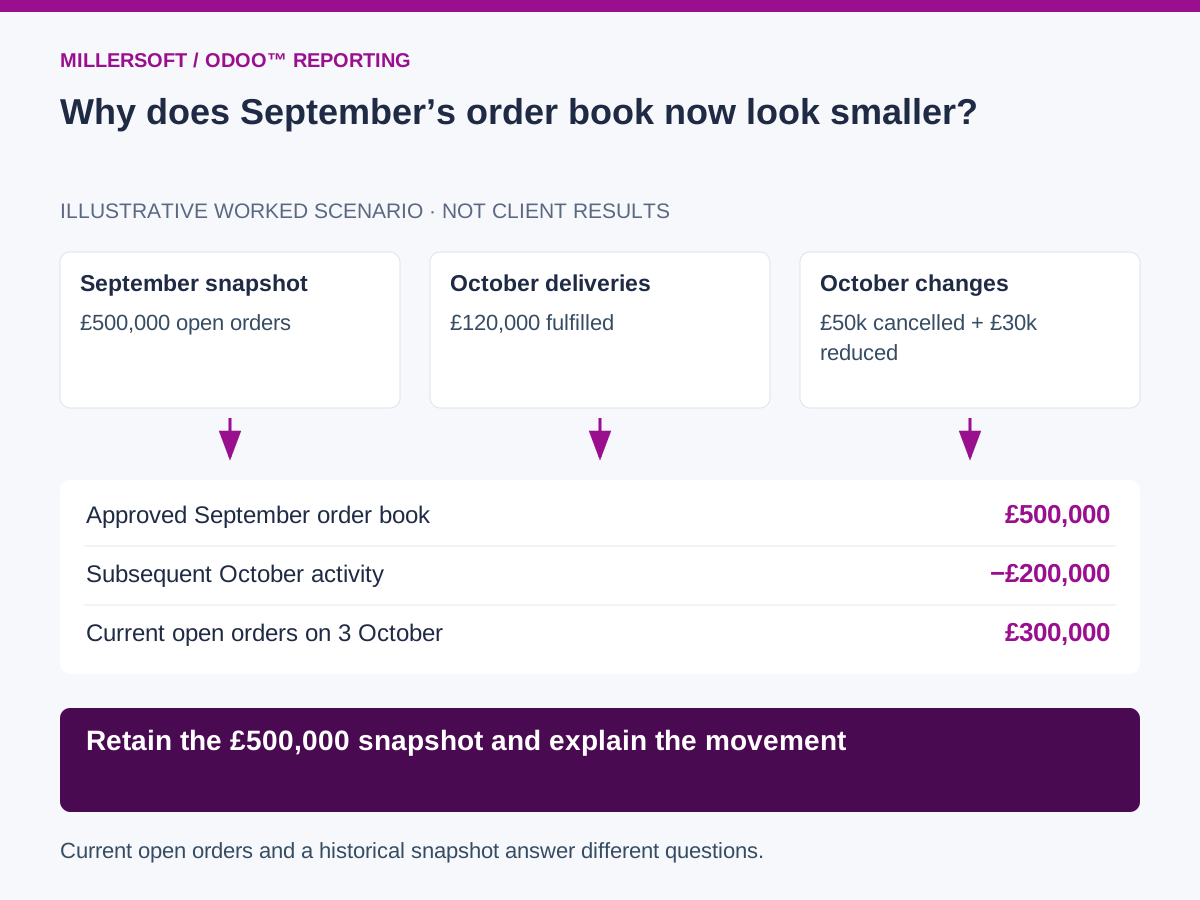
Suppose an illustrative distributor approves a September order book of £500,000, measured as the remaining value of confirmed customer orders before tax. By 3 October, later activity has reduced the current open balance.
| Event | Change in open order value | Remaining balance |
|---|---|---|
| Approved 30 September position | Opening balance | £500,000 |
| Deliveries processed on 1 October | −£120,000 | £380,000 |
| Cancellations agreed on 2 October | −£50,000 | £330,000 |
| Remaining order values reduced on 3 October | −£30,000 | £300,000 |
Assume these events apply after September and do not overlap. Running a report on current open orders gives £300,000. That is useful for today's workload, but it cannot substitute for the original £500,000 September position.
A dated snapshot preserves the approved balance. Retained delivery, cancellation and amendment records explain the £200,000 reduction. If a later correction actually belongs to September, show a separately identified corrected historical view and retain the originally published version.
 (opens the full-size image in a new tab)
What to capture for point-in-time Odoo™ reporting
Use stable identifiers for source instances, companies, orders and order lines. Retain statuses, quantities, prices, discounts, currencies and relevant dates, including links to deliveries and invoices. Capture pipeline stages and expected closing dates when those are part of the reporting scope.
Incremental ingestion needs to handle more than newly created records. Updates, deletions or archived records, partial deliveries and changes to related records can affect the reported position. Choose an extraction method and frequency suited to the deployment and permitted interfaces.
Snapshots and event history serve different purposes. A nightly snapshot can preserve the state observed each night but may miss changes made and reversed during the day. Event capture can provide finer history when the source exposes the required events. Document the actual resolution rather than promising complete history automatically.
Start with one reproducible month-end report
- Define the measure, source scope, currency and reporting cut-off.
- Reconcile a dated extract to the report approved by the business owner.
- Retain relevant source versions and calculation rules.
- Reproduce the original report after subsequent source changes.
- Explain the movement from the historical position to the latest position.
Measure how quickly the team can retrieve an earlier balance, the proportion of changes with identifiable evidence and any gaps in capture coverage. A Data Vault can retain business identities, relationships and descriptive history; curated reporting rules determine what “open” means for each report.
Frequently asked questions
Can a new warehouse recreate years of overwritten Odoo™ records?
Only where evidence survives in backups, audit records, exports or other sources. Begin preserving future changes promptly and label any reconstructed history with its limitations.
Is a backup the same as a historical reporting model?
A backup may recover a database state, but a reporting model also needs definitions, mappings and the rules used to calculate the original output.
Continue exploring Odoo™ reporting
Back to the Odoo™ data warehouse overview.
- Odoo™ stock valuation reconciliation: connect inventory and finance
- Odoo™ sales forecast accuracy: compare pipeline predictions with results
Make your Odoo™ reporting explainable
Talk to Millersoft about a focused Data Vault Engine & Studio pilot using your Odoo™ data, reporting definitions and control requirements.
Discuss your Odoo™ reporting challengeOdoo™ is a trademark of Odoo™ S.A. Millersoft is not affiliated with Odoo™ S.A.